LaTeX Shogi
66 views
9 de julho de 2026
Recently, I've been revisiting one of my last LaTeX projects: @psygo/latex_shogi, a package which allows writers to draw vector diagrams for Japanese chess, or shogi, with LaTeX.
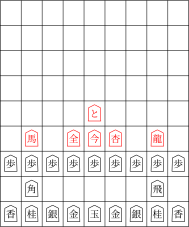
An example diagram using all the pieces.
That project started as an adaptation of the package I had built for drawing LaTeX vector diagrams for the game of Go, which I, in turn, had used to create my Go techniques book: @psygo/tecnicas_de_go.
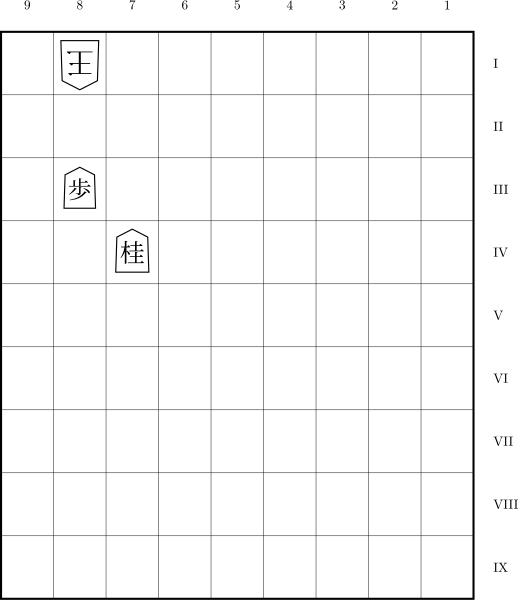
Another example diagram, this time with coordinates.
Through code that's as simple as this, we're now able to draw beautiful shogi diagrams which won't ever pixelate:
\documentclass[12pt]{standalone}

\def\repoPath{/path/to/shogiban}
\usepackage{\repoPath/shogiban/shogiban}

\begin{document}
  \begin{shogiban}[%
    board dimension = 8 cm,
    font scale      = 2.5,
    book style,
    letter ranks
  ]
    % Defending
    \pic at (9, 1) {%
      shogi piece = {%
        text   = \shogiKingGote,
        scale  = 1.25,
        rotate = 180
      }
    };
    \pic at (8, 1) {shogi piece = {text = \shogiGold, scale = 1.15, rotate = 180}};

    % Captured (Gote)
    \pic at (10.5, 1) {shogi piece = {text = \shogiRook, scale = 1, rotate = 180}};

    % Attacking
    \pic at (6, 1) {shogi piece = {text = \shogiRook, scale = 1.2}};
    \pic at (8, 3) {shogi piece = {text = \shogiPawn, scale = 1.1}};

    % Captured (Sente)
    \pic at (-0.875, 9) {shogi piece = {text = \shogiGold, scale = 1}};
  \end{shogiban}
\end{document}
That piece of code generates this square diagram, which is what you're gonna find in most shogi books:
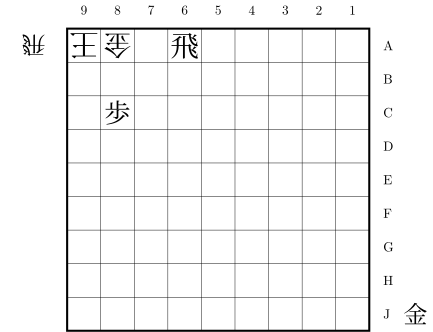
A square diagram example, the more common format in shogi books. Note that we do have the "mochigoma" feature, that is, the captured pieces on the side of the board.
Here's a sample of what can be done with the current package, in Portuguese though:
Programming in LaTeX with AI
One thing I need to add is that AI fastforwarded this project considerably. After I got the first version going, if I were to implement all the other features myself, without any help, I could have easily worked for 2 weeks to have them happen cleanly. Instead, it took me 1-2 days with AI.
Less than 2 years ago, even though AI was doing well in most programming languages, that was not the case when it came to LaTeX. But, now, Claude AI does just as well as anyone — although other AIs might make you suffer quite a lot still. And it does well through code that's very easy to read, which cannot be said about many LaTeX experts out there, who mostly come from the academic world.
Exporting the Diagrams to Vector Images
If you would like to use the diagrams as vector images on other projects, you could just open the resulting PDF inside a vector graphics editor, such Inkscape, and export a selection to a vector graphics image, such as an SVG.
But that's the manual option, which might be more versatile, depending on your context. However, if you prefer the more programmatic version, you could instead use this on the command line:
pdftocairo -svg filename.pdf filename.svgThose are the processes I've been using to create my Go diagrams in my Go articles, such as the okaoigo's one.
Comentários
Você precisa entrar na sua conta para comentar.
Ainda não há comentários.